Automatically create a pool of hibernated nodes at a fraction of the cost, ready to handle any traffic spike.
Reduce application boot time to ensure faster response to traffic spikes and greater stability.
Safely remove idle pod replicas to cut node overprovisioning, optimize CPU utilization, and drive down costs.
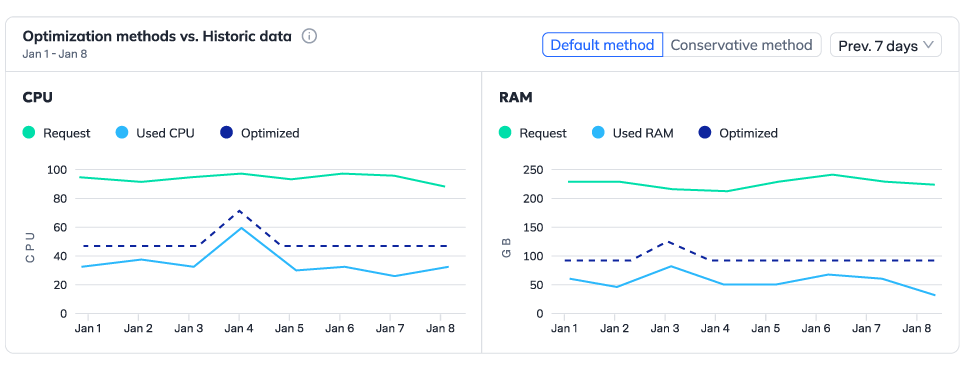
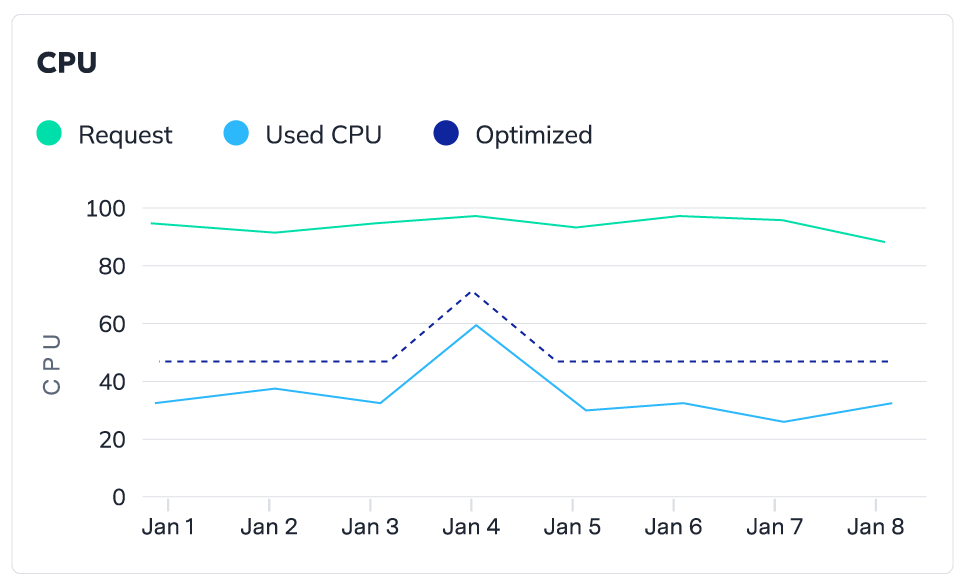
Leverage advanced algorithms to analyze historical and real-time utilization patterns, forecast workload demand, and proactively adjust resources.
Gain real-time insights over your workloads’ utilization, costs, and savings opportunities, to reduce CPU overprovisioning and boost cost efficiency.
FastScaler™ works alongside Karpenter and Cluster Autoscaler to accelerate application startup time, achieving scale-out up to 5x faster.
By combining hibernation and node pre-warming-caching container images, and pre-starting OS services, it enables horizontal scaling decisions to execute instantly and precisely when demand spikes.
Reduce CPU buffer by up to 70% and stop paying for resources you don’t use, kept just to maintain SLAs.
Handle any traffic peak with speed and precision, ensuring your application stays reliable no matter the demand.
Cut wasted hours of manual prediction, configuration, and monitoring with an automation stack you can trust.
Our pricing model is designed to be straightforward and transparent. We charge a base fee plus a fee per CPU managed by Zesty. Importantly, you’re only billed for the CPU managed after optimization. This ensures that you pay only for the resources we actively manage, delivering clear value with every CPU optimized.
Headroom Reduction supports both Cluster Autoscaler (CAS) and Karpenter, enabling headroom reduction across a wide range of Kubernetes environments.
Zesty requires an agent with read-only permissions to gain visibility into your environment and provide accurate recommendations. For our automated headroom reduction solution, an additional agent is needed to enhance efficient automation, requiring permissions for creating nodes, reading logs from Cloudwatch, events from SQS, and more.
No, our platform is designed to maintain performance, ensure stability and preserve SLAs, while optimizing costs. Automation keeps CPU available when needed, ensuring applications run smoothly even as costs are reduced.
Recommendations are available about seven days after connecting a cluster to Kompass. Once a recommendation is activated, headroom reduction is fully automated. Users start seeing measurable savings as early as one hour after activation.