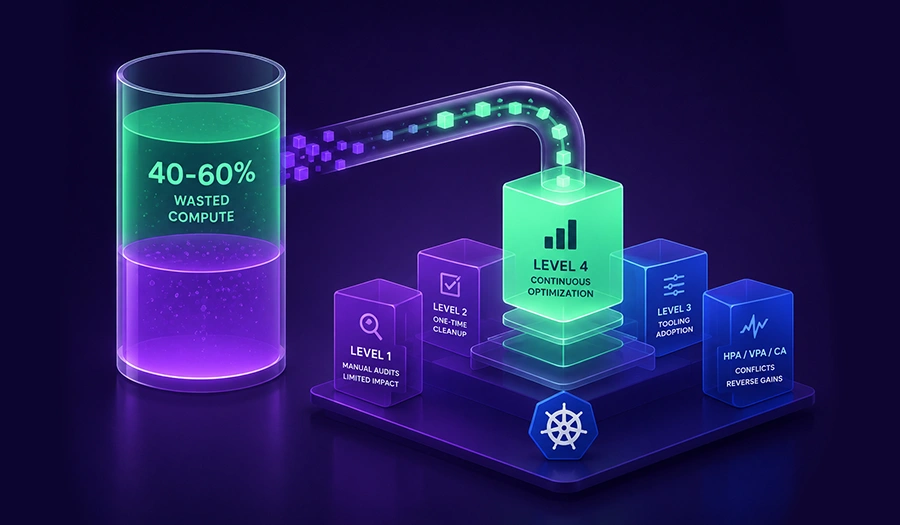
- Kubernetes clusters waste 40-60% of provisioned compute on average, mostly from resource requests set far above actual usage.
- Most teams reach Level 2 (Cleaned Up) and stop. Savings erode within 3-6 months because nothing prevents drift back toward the old baseline.
- Running Horizontal Pod Autoscaler (HPA) and auto-applied Vertical Pod Autoscaler (VPA) on the same workload without coordination is one of the most common ways cost savings reverse.
- A monthly audit cadence is the minimum viable process for holding onto Phase 1-style savings. Most teams manage quarterly at best.
- Zesty’s Multi-Dimensional Autoscaling (MDA) and Adaptive Pod Placement (APP) automate rightsizing and pod placement continuously, so teams reach Level 4 without a dedicated FinOps hire.
The bill went up 40% last quarter. No new services launched. No traffic spike hit. Nothing obviously went wrong, and that is exactly what makes this pattern so common in Kubernetes cost optimization: teams already did the cleanup work, rightsized a batch of workloads, moved some pods to Spot, and watched the number climb back within two or three billing cycles anyway.
The direct answer is that Kubernetes cost optimization is not a single project with a finish line. It is a maturity ladder, and most teams climb the first two rungs and assume the job is done. Level 1 is blind spend with no visibility into what anything actually costs. Level 2 is a one-time cleanup: rightsizing, bin-packing, some Spot adoption, real savings that stall without anyone noticing because nothing is watching for drift. Level 3 adds governance: quotas, limits, and monthly audits that hold the line through continuous human effort. Level 4 is autonomous: the platform itself keeps rightsizing and coordinating autoscalers, so savings compound instead of eroding.
This article walks through why most teams get stuck at Level 2, what goes wrong on the way to Level 3, and what it actually takes to reach Level 4 without hiring a dedicated platform team to run it by hand.
The 4 Levels of Kubernetes Cost Optimization Maturity
Kubernetes cost optimization maturity separates into four distinct levels, and naming them precisely matters more than it sounds like it should, because most teams don’t actually know which level they’re on. They know their last savings number. They rarely know what’s protecting it, if anything is.
Level 1: Blind. No cost visibility, no allocation by namespace or team, and resource requests that were set once during initial deployment and never touched again. Nobody can say with confidence what any given workload costs to run, which also means nobody can say with confidence where the waste actually accumulates.
Level 2: Cleaned Up. Resource rightsizing, node bin-packing, Spot adoption for fault-tolerant workloads, and commitment discounts applied as a one-time pass. This typically delivers 30-50% savings against the Level 1 baseline, and it’s where most published cost-optimization guides stop, largely because it’s the level with the clearest before-and-after number to show. It’s also where most teams stop, which is the actual problem: a one-time cleanup is not a system, and nothing at this level stops the cluster from drifting back toward its old shape once requests age and new workloads land without the same scrutiny.
Level 3: Governed. ResourceQuotas, LimitRanges, monthly audit cadences, and FinOps chargeback or showback so teams can see and own their own spend. Savings hold at this level, but only because someone keeps doing the work every month, which scales with headcount rather than cluster size and eventually runs into a ceiling.
Level 4: Autonomous. Continuous rightsizing and autoscaler coordination handled by a platform instead of a person. Instead of a human reviewing a dashboard once a month, the system applies changes on an ongoing basis as usage shifts. Savings compound instead of eroding, because nothing waits for the next audit cycle, and nothing depends on someone remembering to run one.
Most teams get to Level 2, look at the savings number, and assume they’ve solved Kubernetes cost optimization. That assumption is precisely where cost erosion starts, because Level 2 was never designed to hold on its own. Zesty’s Multi-Dimensional Autoscaling (MDA) is built around closing that exact gap: getting clusters from a one-time cleanup to a system that keeps holding its own shape, so rightsizing stays continuous rather than becoming a quarterly project someone has to remember to schedule.
Level 1 to Level 2: Where the Money Actually Is
Kubernetes Rightsizing: The Quick Win Checklist
Kubernetes rightsizing is the highest-leverage lever in the Level 1 to Level 2 jump, because compute is where most of the spend sits in the first place. Separating cluster spend into categories shows why teams keep gravitating toward the same few fixes, and why that instinct is only half the answer.
| Cost Driver | % of Cluster Spend | Primary Lever | Common Waste Pattern |
|---|---|---|---|
| Compute (pods and nodes) | 60-80% | Rightsizing, bin-packing, Spot | Resource requests set 2-4x above actual usage and never adjusted |
| Storage (Persistent Volumes) | 10-20% | Orphaned Persistent Volume (PV) cleanup, storage-class audits | Volumes left behind after pods are deleted, overprovisioned storage classes |
| Network egress | 5-15% | Topology-aware routing, zone-local traffic | Cross-AZ traffic that could have stayed zone-local |
| Control plane and overhead | 2-10% | Namespace consolidation | Sprawling namespaces and duplicated tooling per team |
Compute dominates the table, which is exactly why it answers the question most people are actually asking when they say “where does most Kubernetes spend go?” The common waste pattern in that row, requests set 2-4x above what a workload actually uses, exists because requests get set once at deploy time based on a guess, and almost nobody goes back to correct it once the service is running without incident.
But the pattern that keeps 15-30% of achievable savings on the table is teams fixing compute and stopping there, never touching storage or network because those categories don’t feel like the obvious target. Orphaned Persistent Volumes, storage claims left behind after the pod that created them is long gone, are among the easiest line items to miss, since nothing in a typical dashboard flags a volume as abandoned. Cross-AZ network egress accumulates the same way, across hundreds of small service-to-service calls, so it rarely gets prioritized until someone totals a full month of it.
The quick-win checklist for the Level 1 to Level 2 jump: rightsize resource requests against real usage, bin-pack nodes so fewer run mostly empty, move fault-tolerant workloads to Spot Instances, apply commitment discounts through Savings Plans rather than long-term commitments, sleep non-production clusters off-hours, clean up orphaned Persistent Volumes, and enforce quotas so the next deploy doesn’t undo the cleanup. Improving cost visibility at this stage, actually knowing what each namespace and workload costs, is what makes the rest of the checklist possible instead of guesswork.
Zesty’s Multi-Dimensional Autoscaling (MDA) handles the compute row of that table on an ongoing basis rather than as a one-time pass, so resource requests keep tracking real usage instead of drifting back toward the original deploy-time guess. Zesty’s PV Autoscaling covers the storage row the same way, adjusting Persistent Volume size as usage changes rather than waiting for the next manual audit to catch an overprovisioned volume or an orphaned claim.
Level 2 to Level 3: Why Kubernetes Autoscaler Conflicts Reverse Savings
Cluster Autoscaler and Karpenter solve a node-level problem: how many nodes should exist right now. Horizontal Pod Autoscaler (HPA) and Vertical Pod Autoscaler (VPA) solve a pod-level problem: how many replicas should run, and how large should each one be. Run without coordination, a kubernetes autoscaler at the node level and one at the pod level don’t just operate independently, they actively work against each other, and that conflict is the single biggest reason Level 2 savings reverse within a quarter. None of the individual tools are misconfigured. The problem is that nobody designed them to negotiate with each other, so each one optimizes its own layer and leaves the interaction between layers unmanaged.
Three failure patterns account for most of it.
Pattern 1: HPA and VPA compound instead of cooperating. HPA scales replica count out in response to load while VPA scales individual pod size up in response to the same load, and if nothing coordinates the two decisions, a cluster can end up running far more total capacity than the workload actually needs. Each autoscaler is doing exactly what it was configured to do. Neither one knows the other is also reacting to the same signal, so a single traffic spike can trigger two separate scale-up decisions that overlap and stack rather than one coordinated response sized to the actual load.
Pattern 2: Node autoscalers hold nodes warm because pod requests are stale. If resource requests haven’t been rightsized recently, Cluster Autoscaler and Karpenter make node-count decisions based on numbers that no longer reflect real usage, and end up keeping nodes running that a leaner, more accurate set of requests would have let go entirely. The node-level tool isn’t wrong here. It’s making a correct decision from stale input, which is a much harder problem to notice than an outright misconfiguration.
Pattern 3: Node consolidation and pod scaling collide in time. Karpenter or Cluster Autoscaler consolidating nodes at the same moment HPA is scaling a workload up produces exactly the failure mode teams least want: pods evicted mid-scale-up, latency spikes, and an on-call page that traces back to two systems that were never designed to negotiate with each other. This is usually the pattern that gets a Level 2 cleanup rolled back entirely, since a production incident tends to outweigh a savings number in the next planning meeting.
Each pattern is a coordination gap, not a configuration mistake in any single tool, which is why teams who are confident their HPA and VPA settings are correct still see costs reverse within a quarter of a Level 2 cleanup. Fixing it requires treating replica count and pod size as one decision instead of two autoscalers reacting independently to the same signal, and treating node consolidation as something that has to happen in sequence with pod-level scaling rather than in parallel with it. Zesty’s Multi-Dimensional Autoscaling (MDA) is built around exactly that first coordination gap, closing Pattern 1 by making replica count and pod size one decision rather than two independent guesses.
Level 3 to Level 4: From Governance to Continuous Cost Optimization
Teams that reach Level 3 run a monthly audit workflow, and it works, up to a point that’s easy to miss until a cluster grows past it. The workflow itself is simple enough to describe in six steps, which is part of why it’s the level most FinOps guides recommend as the endpoint.
- Measure utilization across every workload against its current resource requests.
- Rank workloads by absolute dollar waste, not percentage waste, since a 90% overprovisioned sidecar and a 20% overprovisioned monolith don’t cost the same, and dollar ranking is what keeps the audit focused on the workloads actually worth the effort.
- Flag idle or near-idle workloads for review, since these are usually the fastest wins once someone actually looks.
- Rightsize the top offenders by dollar impact first, working down the ranked list rather than across every workload evenly.
- Recheck node count and bin-packing once requests change, since rightsizing pods shifts what the node autoscaler should do next, and skipping this step leaves nodes sized for the old request values.
- Repeat on a monthly cadence, since anything longer lets drift accumulate past what one audit cycle can reasonably catch up on.
This workflow holds up below roughly 100 workloads on a single cloud. Past that scale, or with multi-cluster environments, GPU workloads, or bursty traffic patterns, manual audits structurally cannot keep pace: new services launch and scale faster than a monthly cycle can review them, and the backlog of unreviewed workloads grows even while the audit process itself is working exactly as designed. A team running the workflow correctly every month can still fall further behind every quarter, simply because the number of workloads needing review grows faster than one person, or even a small team, can work through a ranked list by hand.
That’s the specific gap continuous cost optimization closes: continuous rightsizing and autoscaler coordination applied automatically, rather than surfaced as a recommendation that waits in a queue for a person to act on it. Kubernetes cost optimization tools that only report utilization still require someone to read the report and take action every month, which means the ceiling on Level 3 isn’t the workflow’s logic, it’s the number of hours available to run that logic by hand. Zesty’s Multi-Dimensional Autoscaling (MDA) and Adaptive Pod Placement (APP) apply that same audit logic, rank by dollar impact, rightsize, recheck pod replica count, optimizes pod placement, as a continuous loop instead of a monthly ritual, working alongside whatever node provisioner, Karpenter or Cluster Autoscaler, is already in place, without adding headcount every time workload count grows.
The Kubernetes Cost Optimization Mistakes That Keep Teams Stuck
Most teams that stall don’t stall because they lack tooling. They stall because of a handful of specific, repeatable mistakes.
| Mistake | Why It Happens | What It Costs | Fix |
|---|---|---|---|
| Optimizing for percentage waste instead of absolute dollars | Percentage figures look more dramatic in a dashboard | Hours spent chasing a small workload’s 90% waste while a large workload’s 20% waste goes unaddressed | Rank every audit by dollar impact first, percentage second |
| Treating Spot as plug-and-play | Spot Instances are typically 60-90% cheaper than on-demand, which makes adoption feel urgent | Production incidents when interruptions hit workloads with no PodDisruptionBudget in place | Set PodDisruptionBudgets before moving fault-tolerant workloads to Spot, not after |
| Mixing autoscalers without understanding interactions | HPA, VPA, and node autoscalers each get adopted to solve a separate problem | Compounding capacity, as described in Pattern 1 above | Coordinate pod-level and node-level scaling decisions instead of layering tools independently |
| Ignoring storage and network because they’re “not compute” | Compute holds the biggest number, so it gets the attention | 15-30% of achievable savings left unaddressed | Include Persistent Volume and network egress audits in the same review cycle as compute |
| Declaring victory after Level 2 with no re-audit scheduled | The one-time cleanup produced a real, visible savings number | Drift back toward the Level 1 baseline within 3-6 months | Schedule a recurring audit cadence before calling the cleanup complete, monthly if the team can sustain it |
| Buying a visibility tool and expecting it to fix the cluster | Tools like Kubecost and OpenCost make spend legible, which feels like solving the problem | Ongoing spend that visibility alone never reduces | Pair visibility tooling with something that actually changes resource requests and node placement |
Cost visibility tools report where the money goes. They don’t change the cluster. That distinction is the difference between Level 3 and Level 4, and it’s also where GPU cost optimization tends to fail hardest, since GPU workloads are expensive enough that a visibility dashboard showing the waste doesn’t reduce it, and manual GPU rightsizing carries more risk than teams are usually willing to touch by hand. Zesty’s Multi-Dimensional Autoscaling (MDA) is built to act on exactly the gap that table describes: not another dashboard, but the layer that rightsizes, reduce node fragmentation, and complements autoscalers so the mistakes above stop being a recurring line item.
Which Level Is Your Cluster At?
Level 1 is blind spend. Level 2 is a real, one-time cleanup that most published guides treat as the destination. Level 3 adds the governance, quotas, audits, chargeback, that keeps Level 2’s savings from eroding, at the cost of ongoing human effort. Level 4 is what happens when that governance work gets automated instead of scheduled.
Most well-run teams plateau at Level 3, and for good reason: it’s the highest level reachable through process and headcount alone. Reaching Level 4 without hiring a dedicated FinOps or platform team to run monthly audits by hand is only realistic with an automated layer underneath the cluster. See where Zesty fits into your cluster’s maturity level, applying autonomous rightsizing and horizontal scaling out of the box, working alongside whatever node provisioner, Karpenter or Cluster Autoscaler, a team already has in place, rather than replacing it.
Figuring out which level a cluster is actually on is the first step. Most teams find they’re further from Level 4 than the Level 2 savings number led them to believe.
Book a Demo with Zesty to see exactly where your cluster stands, and what it would take to close the gap.
FAQs
What is Kubernetes cost optimization, and why does the bill keep rising even after cleanup?
Kubernetes cost optimization is the ongoing practice of matching cluster resources, compute, storage, and network, to actual workload usage rather than initial guesses. Costs rise again after a one-time cleanup because nothing prevents resource requests, node counts, and autoscaler configurations from drifting back toward their old shape once the cleanup project ends and nobody is watching for drift.
How much can Kubernetes cost optimization actually save, and how long does it take?
A first-pass cleanup (Level 2) typically delivers 30-50% savings against an unmanaged baseline within weeks, since it mostly involves rightsizing existing workloads and bin-packing existing nodes rather than any deeper architectural change. Holding onto those savings long-term (Level 3 and Level 4) is a separate, ongoing effort rather than a one-time project with a fixed end date, and it’s usually where teams underestimate how much work is left after the first savings number lands.
Why do HPA and VPA conflict, and how do I run them together safely?
Horizontal Pod Autoscaler (HPA) and Vertical Pod Autoscaler (VPA) solve different problems, replica count versus pod size, and can compound each other’s response to the same load signal if nothing coordinates the two decisions. Running them safely together requires a layer that treats replica count and pod size as one decision rather than two independent autoscalers reacting separately to the same traffic pattern.
When should I use Spot Instances for Kubernetes workloads, and what's the risk?
Spot Instances suit fault-tolerant, stateless workloads that can handle interruption, and typically cost 60-90% less than on-demand pricing, which makes them one of the highest-leverage levers in a Level 2 cleanup. The main risk is treating Spot adoption as plug-and-play: workloads without PodDisruptionBudgets in place can fail visibly when an interruption hits, which is why Spot adoption should follow, not precede, PodDisruptionBudget configuration.
How does Zesty differ from cost visibility tools like Kubecost or OpenCost?
Kubecost and OpenCost report where Kubernetes spend goes, which is valuable for allocation and chargeback but doesn’t change resource requests or pod placement on its own. Zesty’s Multi-Dimensional Autoscaling (MDA) and Adaptive Pod Placement (APP) automate rightsizing and pod placement continuously, acting on the waste a visibility tool surfaces rather than only reporting it.