
Kubernetes workloads are notoriously hectic, with traffic changing from one minute to the next. To keep up, DevOps teams rely on autoscaling, using two core mechanisms: Horizontal Pod Autoscaling (HPA) to adjust the number of pod replicas, and Vertical Pod Autoscaling (VPA) to manage CPU and memory allocations for each pod.
But when both are applied to the same workload attempting to optimize the same metric (CPU), they tend to interfere with one another, leading to scaling loops, conflicting decisions, and unstable performance.
Pod Rightsizing addressed part of this problem by continuously aligning CPU and memory requests to actual usage. But rightsizing a pod in isolation only goes so far when replica counts are still reacting to miscalibrated signals.
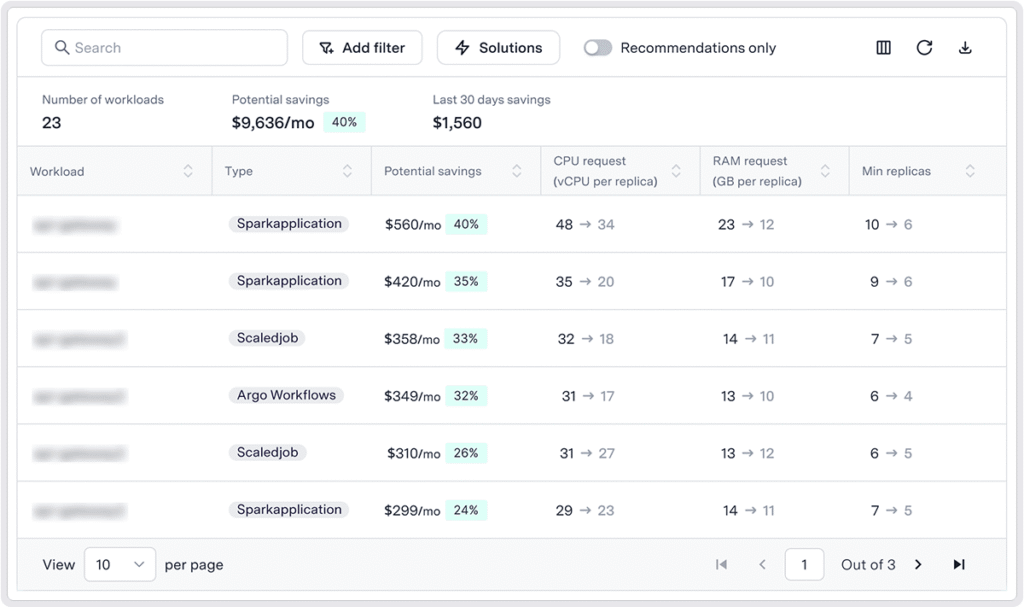
Zesty’s Multi-Dimensional Autoscaling (MDA) is the next step in the evolution of Pod Rightsizing, enabling vertical and horizontal autoscaling to optimize workloads together based on real workload behavior, helping teams to maximize cluster utilization, cut costs, and enhance performance.
Why combining HPA and VPA has been so hard
The challenge is that in the context of Kubernetes resource optimization, HPA and VPA both react to the same utilization metrics, but from different directions.
HPA responds to utilization by changing the number of pod replicas. VPA responds by changing the CPU and memory requests assigned to each pod. When both are active on the same workload, one adjustment can change the signal the other relies on.
For example:
VPA increases CPU requests, lowering CPU utilization percentage → HPA sees that and scales replicas down → Utilization rises again → VPA increases CPU requests → Feedback loops form, where each controller reacts to changes introduced by the other, and none is working towards higher efficiency or traffic spike preparedness.
And that’s even without mentioning the inefficiency of HPA replicating unoptimized pods with misaligned resource requests, spreading the inefficiencies across the cluster.
This is why many teams disable VPA or limit its scope. The result is a compromise. You scale well but waste resources, or you optimize resources manually and risk performance.
How MDA keeps everything in sync
Multi-Dimensional Autoscaling coordinates resource allocation and replica scaling so they work together.
It continuously aligns two dimensions:
- Pod-level resources like CPU and memory
- Workload-level scaling through replica counts
Instead of acting independently, these decisions are made together based on real-time usage.
A few key principles behind how it works:
Continuous pod rightsizing
CPU and memory requests are adjusted based on actual usage patterns. This helps eliminate overprovisioning while avoiding issues like throttling or OOM events.
Replica optimization tied to demand
Replica counts are dynamically tuned to match workload demand, so you are not carrying unnecessary baseline capacity.
Coordinated scaling logic
HPA, VPA, and tools like KEDA are orchestrated together so they do not compete. Resource requests and replica counts stay aligned, which prevents scaling loops and instability.
Policy-driven guardrails
Teams can define how aggressive or conservative the system should be. You can prioritize cost reduction, performance stability, or a balance of both depending on the workload.
Built-in safety mechanisms
Changes are rolled out gradually, with auto-healing and protections in place. Resource updates happen without restarting pods, reducing disruptions.
What this looks like in real environments
In production, this plays out in a few common ways:
Scenario 1: Dynamic, user-facing services
An API experiences unpredictable traffic behavior. With HPA alone, you scale replicas quickly, but you may still hit CPU limits or over-allocate resources just in case.
With MDA, replicas scale with demand while CPU and memory are continuously rightsized. The system maintains performance without relying on overprovisioning resources, and leverages FastScaler technology to scale up quickly when traffic surges. So there’s no danger of throttling or downtime.
Scenario 2: Stateful workloads with steady growth
A StatefulSet gradually increases in resource consumption over time. Manual tuning often lags behind, which may lead to performance degradation.
MDA adjusts resource requests as usage evolves, while ensuring the number of replicas matches actual demand. This keeps utilization high without risking instability.
Scenario 3: CronJobs
CronJobs can have very different usage patterns compared to long-running services, and static configurations tend to be inefficient. By grouping recurring and short-lived workloads into virtual workload groups, teams can generate more accurate rightsizing recommendations even for ephemeral workloads.
MDA adapts scaling and resource allocation to each workload type, so short-lived jobs get the resources they need without overprovisioning.
What teams are already seeing
Users are seeing measurable impact both in cost and operational overhead within the first hour.
In some case we get over 40% optimization in cluster size, without the need for manual interventions.
These results are consistent with what we see across environments. When resource allocation and scaling decisions are aligned, clusters run closer to actual demand. Utilization improves, and engineers spend less time reacting to symptoms.
How this compares to traditional approaches
Most teams today rely on a mix of:
- Static resource requests with conservative buffers
- HPA for reactive scaling
- Occasional manual rightsizing
This approach works, but it leaves gaps:
- Decisions are based on limited historical data
- Scaling and rightsizing are disconnected
- Engineers are responsible for ongoing tuning
MDA shifts this to a continuous, automated model:
- Decisions are based on real-time insights
- Resource allocation and horizontal scaling are coordinated
- Policies and automation replace manual intervention
Pod Rightsizing was an early step in this direction, automating what teams previously did by hand. MDA takes that foundation and connects it to horizontal scaling, so the two never work against each other.
The result is higher utilization, reduced costs, fewer performance risks, and significantly less operational overhead.
Where this fits in your stack
MDA is designed to work with the tools you already use.
It integrates with native Kubernetes autoscaling mechanisms and supports a wide range of workloads, including Deployments, StatefulSets, CronJobs, Java, Argo and more specialized configurations.
Setup is straightforward. Most teams can connect a cluster and start seeing recommendations within about 24 hours. Once enabled, teams can gradually apply automation based on their own policies and workload requirements, moving from recommendations to automated optimization at their own pace. Many users begin seeing measurable savings within the first hour of activating automation.
What to do next
If you are currently choosing between HPA and VPA, or spending time trying to make them coexist, this is worth exploring.
You can:
- Connect a cluster and review initial recommendations
- Define policies that match your performance and cost goals
- Gradually enable automation and observe the impact
If you want a deeper look at how it works in your cluster, book a demo with our team and see the potential savings for your specific environment.