- Kubernetes teams commonly waste 30-50% of cloud spend on overprovisioned resources that go uncorrected between quarterly reviews.
- FinOps visibility tools show you where waste is; they don’t remove it, someone still has to act on every recommendation.
- Specialized utilities solve one narrow problem well but leave every other layer of the cost stack untouched.
- Zesty’s Multi-Dimensional Autoscaling continuously rightsizes both pod resource requests and replica counts as one coordinated decision, delivering up to 70% savings on compute and storage without manual tuning.
- The right tool category depends on whether your team needs automation, visibility, or a low-risk starting point, not on which tool has the longest feature list.
Introduction
What are the best Kubernetes cost optimization tools? The answer depends entirely on whether you need a tool that acts, one that reports, or one that solves a single narrow problem, and most comparisons on this topic skip that distinction and list tools as if they’re all competing for the same job.
Kubernetes teams commonly waste 30-50% of cloud spend on overprovisioned resources, and that waste doesn’t correct itself between review cycles, it accumulates. The tools built to address it fall into three distinct categories: autonomous platforms that continuously rightsize and enforce changes without a human applying each one, FinOps visibility tools that allocate and surface spend but stop at the report, and specialized utilities that solve one narrow layer of the problem, Spot scheduling or VPA-based recommendations, for example, without attempting the whole stack.
That category distinction matters more than any single feature comparison, because different teams actually need different categories. A finance team building chargeback models needs visibility. A platform team drowning in manual rightsizing tickets needs automation. Throughout this guide, every tool gets evaluated against the same four dimensions: automation depth (fully automated versus recommendations only), production readiness (stateful workload and Pod Disruption Budget (PDB) support), integrations (Horizontal Pod Autoscaler (HPA), Vertical Pod Autoscaler (VPA), and Karpenter compatibility), and real-world impact (verified cost reduction). Kubernetes rightsizing done manually, on a quarterly cadence, is the specific failure mode every category here is trying to close in a different way.
The Three Categories of Kubernetes Cost Optimization Tools
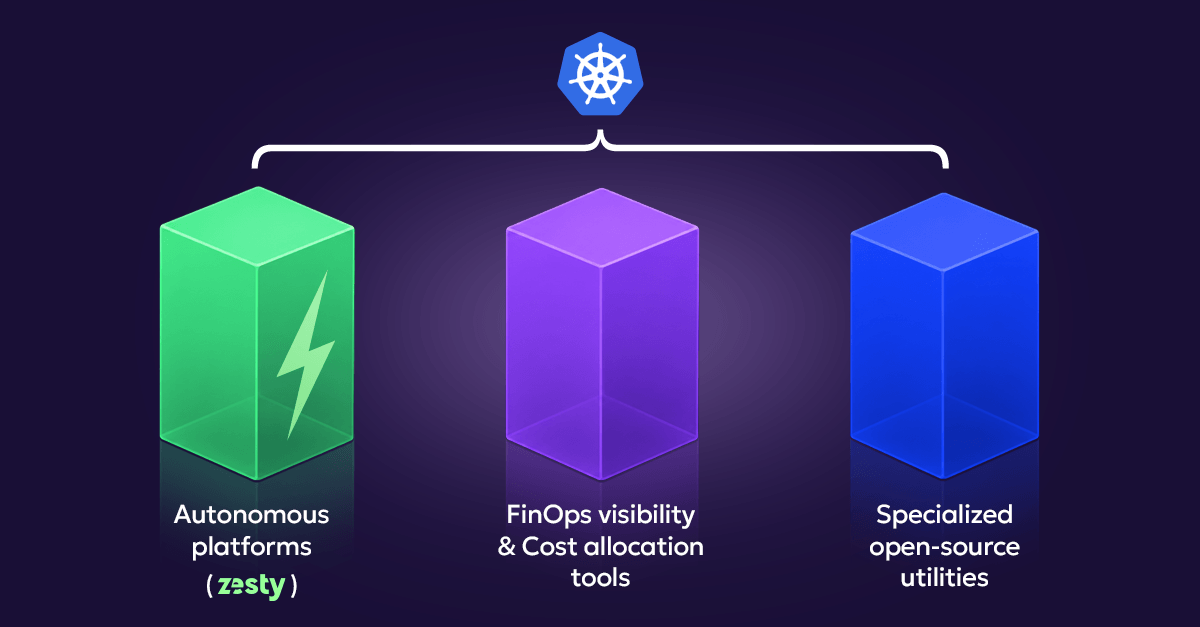
What are the different types of Kubernetes cost optimization tools? Three categories, each solving a different job.
Autonomous platforms provide continuous, context-aware optimization with automatic enforcement, no human has to approve each individual change. They’re built for production teams that want hands-off optimization and are willing to invest in integration and testing upfront to get it. Typical capabilities include real-time CPU and memory rightsizing, predictive scaling, and node bin-packing, and typical cost reduction runs 50-80%, the highest ceiling of the three categories.
FinOps visibility and cost allocation tools report cost, chargeback, showback, and anomaly detection, without taking action themselves. They’re built for finance and engineering teams that need to understand spend and allocate it accurately across namespaces, teams, or features. They’re excellent at showing waste, but a human still has to act on every recommendation, which caps typical cost reduction around 10-30%, dependent entirely on how consistently someone follows through.
Specialized optimization utilities target one narrow optimization surface, VPA-based rightsizing recommendations or Spot instance scheduling, for example, rather than the whole cost stack. They’re low-friction and low-overhead, a reasonable entry point for teams starting small or optimizing one specific layer, but limited in scope, with typical savings in the 10-25% range depending on which layer they address.
| Feature | Autonomous | Visibility | Specialized |
| Automation | Full automatic enforcement | None, reports only | Recommendations only |
| Human effort | Minimal | High, manual review required | Moderate |
| Typical cost reduction | 50-80% | 10-30% | 10-25% |
| Setup time | 2-4 weeks | Days | Hours |
| Production safety | Built-in | Not applicable | Depends on the tool |
The question that determines which category you need is simple: does this tool report waste, or does it eliminate it?
Which Category Fits Your Cluster? A Quick Self-Check
How do I know which type of Kubernetes cost tool I need? Check your cluster against these three short lists, whichever column matches you most is where to start.
You’re likely in the Autonomous column if:
- Your team spends real hours every month manually applying rightsizing recommendations.
- Utilization stays low even after your last optimization push, because the gains eroded before the next one.
You’re likely in the Visibility column if:
- You can’t currently say what a specific team or feature costs to run.
- Finance and engineering don’t agree on where the cloud bill is actually going.
You’re likely in the Specialized column if:
- You’re optimizing one specific layer, Spot, GPU, or VPA-based recommendations, and don’t need a full platform yet.
- You want a low-risk way to start before committing to a broader automation decision.
Deep Dive: Autonomous Platforms
Why do autonomous Kubernetes cost platforms outperform manual approaches? Because manual rightsizing can’t keep pace with how fast workloads actually change.
Workload requirements shift faster than quarterly reviews can track them. Drift accumulates in the gap between deployment cycles, not because anyone made a mistake, but because nobody re-ran the review. DevOps and application teams frequently disagree on resource configuration, and without continuous, data-driven correction, that disagreement gets resolved by whoever argued hardest in a meeting, not by actual usage data. Predictive, continuous models simply outperform scheduled, batched ones, since drift never gets the chance to accumulate into a quarterly-sized problem.
Zesty is the clearest example of a production-grade autonomous platform in this category. At its core, Zesty’s Multi-Dimensional Autoscaling continuously rightsizes pods on two dimensions at once: vertically, tuning CPU and memory requests to match real usage, and horizontally, tuning minimum replica counts to match actual demand, with the two dimensions coordinated with each other as one system rather than run as two independently-tuned processes that can drift apart.
That coordination is what actually separates an autonomous platform from two point tools bolted together. A vertical resize and a horizontal replica change made independently can work against each other, one system reacting to a signal the other system just changed, producing oscillation instead of a stable, converged result. Treating both dimensions as a single decision is what removes that risk without requiring a platform team to manually keep the two in sync.
Beyond pod-level rightsizing, Zesty covers node-level consolidation through Adaptive Pod Placement, storage through PV Autoscaling, fast node provisioning for spike protection through FastScaler, and cloud commitment management through AWS/Azure Commitment Optimization, all coordinated rather than run as separate initiatives. Reported outcomes include up to 70% savings on compute and storage, over 40% optimization in cluster size, sizing recommendations available within 24 hours of activation, and measurable savings achievable in under an hour after turning it on.
When evaluating any tool in this category, the features worth comparing are automation depth (does it handle replicas and nodes, not just pod requests?), predictive versus reactive scaling, stateful workload support, safety guardrails, and deployment model. Limitation: the depth of automation means less manual override for teams that specifically want to approve every change by hand before it lands.
Autonomous platforms aren’t the right starting point for every team. Small teams running fewer than 10 namespaces with simple workloads may find the integration effort disproportionate, and teams still learning the basics of requests and limits are usually better served starting there before layering automation on top. A team that hasn’t yet established what its own workloads actually need doesn’t gain much from a platform that automates a decision it can’t yet evaluate on its own.
Deep Dive: FinOps Visibility Tools
What do FinOps visibility tools actually do for Kubernetes costs? They answer the question of where money is going, without changing anything themselves.
Cost allocation, chargeback, unit economics, and anomaly detection all exist to get finance and engineering speaking the same language: who caused this spend, how should internal teams be billed for it, what does a given feature actually cost to run, and why did costs spike unexpectedly last Tuesday.
Kubecost provides real-time cost monitoring and allocation by namespace, deployment, and label, with a free tier and multi-cloud support. It’s one of the most widely adopted tools in this category specifically because installation is fast and the allocation detail is unusually granular. Limitation: it surfaces optimization recommendations rather than executing them, so realizing savings still depends on someone applying the change manually.
CloudZero focuses on cost intelligence and unit economics, mapping spend to product, customer, or feature rather than just account or service. It’s strong for engineering-led FinOps and for organizations that need to answer “what does this feature cost” in board-level terms. Limitation: it’s a reporting and intelligence layer, not an automated remediation engine.
OpenCost is the CNCF-incubating, open-source standard for Kubernetes cost allocation, and the engine several commercial tools build on. It’s a strong, transparent starting point for teams that want cost visibility with no vendor relationship or license cost. Limitation: self-hosting means your own team owns setup and ongoing maintenance, and it’s visibility only.
Across all three of these tools, the recurring theme is depth of insight without depth of action. Each is a real strength at the specific job it was built for, and none of them changes a resource request, replica count, or volume size on its own.
The critical limitation across this entire category, not just these three tools, is the same one repeated in every profile above: visibility tools stop at showing you the waste. Zesty’s approach to compute cost visibility is built specifically to pair with automation rather than stop at the report, tying the same namespace- and workload-level cost detail directly to the rightsizing decisions Zesty’s platform acts on.
Deep Dive: Specialized Utilities
When should I use a specialized Kubernetes cost tool instead of a full platform? When you’re solving one specific, narrow problem and don’t need, or aren’t ready for, a full platform yet.
Specialized tools are a legitimate low-risk entry point: low operational overhead, easy to understand and tune, and minimal risk to adopt because the scope is intentionally small.
Goldilocks is an open-source dashboard built on top of the Vertical Pod Autoscaler (VPA) that visualizes recommended requests across namespaces. It’s a fast, low-commitment way to see sizing recommendations before deciding whether to automate anything. Limitation: it’s visualization only, applying any recommendation still requires manual action, and it inherits every scaling limitation of VPA itself.
The trade-offs of this category are consistent regardless of which specific tool you pick: limited scope, manual action required to realize any benefit, and a real risk of conflicts in multi-tool environments, VPA and HPA configured against the same metric being the most common example. Specialized tools are often the right first step rather than a lesser one, a way to learn your actual workload patterns before deciding whether to upgrade to a full autonomous platform.
That progression is worth naming explicitly, since it’s easy to treat a specialized tool as a permanent choice rather than a phase. A team that starts with Goldilocks to understand its own sizing patterns, then moves to an autonomous platform once the manual-application burden becomes the actual bottleneck, isn’t wasting the initial investment, the usage data and intuition built during that phase carry forward directly into how confidently the team can trust an automated system with the same decisions.
Comparing All 6 Tools: Three Tables
See how Zesty compares across all three categories in the tables below.
Table 1: By Category
| Feature | Autonomous | FinOps Visibility | Specialized |
| Automation | Full auto | None, reports only | Recommendations only |
| Human effort | Minimal | High | Moderate |
| Cost reduction | 50-80% | 10-30% | 10-25% |
| Setup time | 2-4 weeks | Days | Hours |
| Production safety | Built-in | Not applicable | Depends on the tool |
| Best for | Teams valuing automation | Finance and cost tracking | Starting simple |
Table 2: Autonomy vs. Coverage
| Tool | CPU/Memory | Replicas | Nodes | Storage | Stateful Support |
| Zesty | Continuous, coordinated | Continuous, coordinated | Yes (Adaptive Pod Placement) | Yes (PV Autoscaling) | Yes |
| Kubecost | Recommends | No | No | No | Not applicable |
| CloudZero | Recommends | No | No | No | Not applicable |
| OpenCost | Recommends | No | No | No | Not applicable |
| Goldilocks | Recommends (VPA-based) | No | No | No | Depends on VPA config |
Table 3: Deployment & Integration
| Aspect | Zesty | Visibility Tools | Goldilocks |
| Multi-cloud | Yes (AWS, Azure) | Varies by tool | Not applicable |
| HPA compatible | Yes | Not applicable | Yes |
| Karpenter compatible | Yes | Not applicable | Not applicable |
| Deployment | SaaS | Varies (SaaS or self-hosted) | Self-hosted |
How to Choose: A Decision Framework
How do I choose the right Kubernetes cost optimization tool for my team? Work through these five questions in order.
- Do you need automation or visibility? If automation, see Deep Dive: Autonomous Platforms above. If visibility for finance, see Deep Dive: FinOps Visibility Tools above. If you’re just starting out, see Deep Dive: Specialized Utilities above.
- What’s your team size and cluster complexity? Under 10 namespaces with a small team, a specialized tool may be sufficient. 10-50 namespaces and growing, consider an autonomous platform. 50+ namespaces across multiple teams, an autonomous platform paired with a visibility tool is the common combination.
- What’s your deployment constraint? If SaaS deployment is acceptable, every category is on the table. If you have specific data residency or compliance requirements, confirm deployment model before evaluating further, not after.
- What’s your current architecture? Already running VPA, a specialized tool can extend it. Already running HPA, you need automation that coordinates cleanly rather than fighting it on the same metric. Already running Karpenter, look for Karpenter-aware optimization specifically.
- What’s your expected ROI threshold? Needing 50%+ cost reduction points to an autonomous platform. Comfortable with 20% for low effort points to visibility plus manual fixes. Wanting to start small and scale points to a specialized tool first.
None of these five questions is meant to produce a single, permanent answer. Team size grows, architecture changes as Karpenter or KEDA gets adopted, and the ROI threshold a team is comfortable with shifts once the first round of savings actually lands. Running through this list once a year, or whenever the cluster changes meaningfully, is a reasonable way to confirm the category you picked still fits the team you’ve become.
Final Verdict and Recommendations
For production teams wanting autonomous optimization, Zesty is the clear choice in this comparison: continuous, coordinated rightsizing across pods, nodes, storage, and commitments, with reported outcomes of up to 70% savings on compute and storage and measurable results within an hour of activation.
For teams focused on cost transparency and chargeback, Kubecost or CloudZero are strong choices depending on whether granular Kubernetes-native allocation (Kubecost) or broader unit-economics reporting (CloudZero) matters more to your finance stakeholders.
For teams just starting their optimization journey, Goldilocks is the lowest-friction entry point, free, fast to deploy, and a reasonable way to build intuition before committing to a bigger platform decision.
The ideal architecture for most growing teams combines an autonomous platform with a visibility tool: one handles the fix, the other handles the attribution, and together they deliver low operational effort with full cost transparency rather than forcing a choice between the two.
Zesty automates Kubernetes cost optimization end to end, covering pods, nodes, storage, and commitments from a single platform rather than asking you to stitch several point tools together. Book a Demo with Zesty to see it applied against your own cluster.
Related Reading
This guide is one piece of a broader look at Kubernetes cost optimization. For a deeper look at how to evaluate tools by decision criteria rather than a straight feature list, see Kubernetes Cost Optimization Tools: A 2026 Buyer’s Guide to Choosing the Right Platform. For the mechanics behind pod-level rightsizing specifically, see our guides on Kubernetes Pod Rightsizing Tools, Kubernetes Requests and Limits, Kubernetes Capacity Planning, and our roundup of FinOps Automation Tools for Cloud Cost Optimization.
Frequently Asked Questions
What's the difference between autonomous rightsizing and VPA?
VPA recommends new resource values and, in most production deployments, requires a human to review and apply them. Autonomous platforms apply changes continuously without that manual step, and coordinate the change with other scaling decisions happening on the same workload at the same time.
Can I use multiple tools together, like a visibility tool plus an autonomous platform?
Yes, this is a common and reasonable combination. A visibility tool handles chargeback and allocation reporting while an autonomous platform handles the actual rightsizing, which means finance gets accurate attribution against a bill that’s already being actively optimized.
How much cost reduction is realistic?
Autonomous platforms commonly report 50-80% compute cost reduction. Visibility tools paired with consistent manual follow-through typically land around 10-30%. Specialized utilities addressing one layer typically deliver 10-25%, depending on which layer they target.
Does Kubernetes cost optimization risk disrupting my workloads?
Not if the tool is production-grade with real safety controls, Pod Disruption Budget (PDB) awareness, gradual rollout, and guardrails against undersizing memory. The risk comes from applying changes based on averages instead of real usage percentiles, not from automation itself.
Is self-hosted vs. SaaS deployment a deal-breaker?
For regulated or air-gapped environments, deployment model is a real, early-stage filter worth confirming before evaluating anything else. For standard cloud environments, both models are commonly viable, and the decision usually comes down to operational preference rather than a hard requirement.
Should I start with recommendations or go straight to automation?
That depends on risk tolerance and team readiness more than on the tools themselves. Teams new to a given workload’s usage pattern often benefit from a short recommendation-only period first; teams that already understand their traffic well can move to automation sooner without losing much in return.
How does Zesty reduce Kubernetes costs compared to visibility-only tools?
Zesty’s Multi-Dimensional Autoscaling continuously rightsizes both pod resource requests and minimum replica counts, coordinated with each other as one system, and applies the change directly rather than surfacing a recommendation for a person to act on. That’s the structural difference between a visibility tool showing you a namespace is overprovisioned and Zesty actually resizing it.