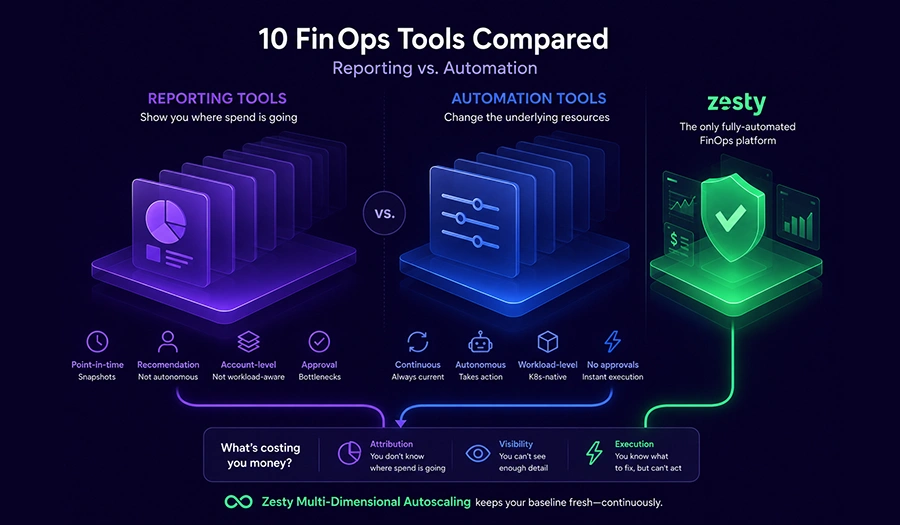
- FinOps tooling follows a maturity path, not a feature checklist: visibility first, then allocation, then automation, and skipping a stage tends to create more problems than it solves.
- Tools like Kubecost, Robusta KRR, and AWS Cost Explorer answer “where is the money going,” but stop there, someone still has to act on what they surface.
- CloudZero, Finout, IBM Apptio Cloudability, and VMware CloudHealth solve the allocation problem, attributing spend to the right team or product, but still leave execution to a human.
- Zesty’s Multi-Dimensional Autoscaling (MDA) automates Kubernetes rightsizing continuously, while Adaptive Pod Placement (APP) handles node-level bin-packing and its Commitment Optimization manages cloud commitments, together cutting compute costs by 50-80% without manual review cycles.
- Most teams don’t need a new tool, they need an honest read on which stage they’re actually stuck at.
Why do FinOps tools seem so hard to compare? Because most of them aren’t actually competing for the same job. A cost visibility dashboard and an autonomous rightsizing engine get placed side by side in roundup after roundup as if they’re rival products, when they really sit at different points on the same maturity path.
That path has four stages: visibility, where spend becomes measurable in the first place; allocation, where that spend gets attributed to the team or product that caused it; rule-based action, where well-understood fixes get automated within pre-set boundaries; and full automation, where a system continuously measures and adjusts resources with no person approving each change. This isn’t a ranked “best tools” list. It’s a map of where a team’s own maturity determines which tool actually helps, and why the tool that helped six months ago might already be holding a team back today.
Most published comparisons skip this distinction entirely, and the cost of that isn’t just a confusing article, it’s a real procurement mistake. A team stuck at Stage 1 that buys a Stage 4 automation platform ends up automating decisions built on data nobody’s confirmed is accurate yet. A team that’s already outgrown Stage 2 but keeps shopping for another allocation tool ends up with a fourth dashboard confirming what the first three already told them. Knowing which stage you’re actually in matters more than knowing which vendor has the best reviews. (If you want a direct, side-by-side feature comparison instead of a maturity path, our broader roundup of FinOps automation tools covers the same category in that format.)
Why FinOps Tooling Is a Ladder, Not a Feature List
Why can’t a team just pick the FinOps tool with the most features? Because features don’t compound the way maturity stages do, and a tool built for one stage doesn’t help a team that hasn’t finished the stage before it.
A team with no cost visibility can’t meaningfully benefit from automation, since automating a decision you can’t yet measure just automates a guess more quickly. A team with good visibility but no allocation still can’t act with confidence, because nobody agrees on who owns which piece of spend, and a fix nobody’s authorized to make doesn’t ship regardless of how clearly it’s been identified. Automation only pays off once the first two stages are solid, since it needs accurate, attributed data to act on in the first place. Skipping a stage doesn’t save time, it just relocates the problem downstream, usually to the exact moment a team tries to prove the automation is working.
The stages also aren’t just a conceptual nicety, they map onto real organizational friction. A visibility-stage team’s biggest obstacle is usually technical: getting metrics flowing and dashboards built. An allocation-stage team’s biggest obstacle is usually political: getting different teams to agree on how shared infrastructure costs should be split. A rule-based-action team’s obstacle is scope: deciding which fixes are safe enough to pre-approve. A full-automation team’s obstacle is trust: being willing to let a system make changes without a human reviewing each one first. Recognizing which kind of obstacle you’re actually facing is often more useful than any feature comparison.
Stage 1: Visibility, Knowing Where the Money Goes
What does a FinOps visibility tool actually do? It makes cost data visible, at the cluster, namespace, or account level, without yet attributing it to a team or acting on it.
Kubecost is the clearest example for Kubernetes specifically: real-time cost monitoring at the cluster, namespace, workload, and pod level, built on Prometheus. It’s often the first serious tool a platform team installs, since it turns an abstract cloud bill into a concrete picture of which namespace or deployment is actually driving spend. (For a closer look at where Kubecost’s visibility stops and where automation picks up, see our Kubecost vs. Zesty comparison.) Robusta KRR takes a narrower, open-source approach: it analyzes historical usage through Prometheus to recommend CPU and memory requests and limits, with no cost beyond whatever it takes to host it, making it a reasonable entry point for teams on a limited budget. AWS Cost Explorer sits at the account level rather than the workload level, native AWS reporting and forecasting with no Kubernetes-specific insight, but no added cost either, a sensible default for teams that haven’t yet outgrown what’s built into the console.
All three are real, useful tools, and starting here isn’t a lesser choice, it’s usually the correct first step. The limitation isn’t in what they show, it’s in what happens after: a Kubecost dashboard flagging an overprovisioned namespace and a Robusta KRR recommendation sitting in a ticket queue both depend entirely on a person noticing and acting on them, and that dependency is exactly what caps how much savings a visibility-only stage can ever produce on its own.
Teams often stay at this stage far longer than they need to, and usually for a reasonable-sounding reason: the dashboard is truly informative, so it feels like progress every time someone opens it. But informative and effective aren’t the same thing. A namespace that’s been flagged as overprovisioned for three consecutive months hasn’t gotten cheaper because someone keeps looking at the number, it’s gotten cheaper the one time someone actually resizes it. The tools at this stage are doing their job correctly; the gap is entirely in what happens after the dashboard loads.
Stage 2: Allocation, Attributing Spend to the Right Team
What does a FinOps allocation tool solve that a visibility tool doesn’t? It turns raw visibility into accountability, mapping spend to the product, team, or feature that actually caused it.
CloudZero does this by mapping cloud spend to business dimensions, product, customer, feature, team, rather than stopping at accounts or services, which matters most for engineering-finance alignment and understanding real unit economics. Finout takes a different route to a similar goal: virtual tagging and shared-cost allocation designed specifically for environments where tagging hygiene is inconsistent, common in organizations that inherited infrastructure through acquisitions or migrations. IBM Apptio Cloudability serves the enterprise end of this stage, showback, chargeback, and forecasting built for large, process-mature FinOps organizations with formal budget approval cycles already in place. VMware CloudHealth, now part of Broadcom’s Aria suite, rounds this stage out with multi-cloud reporting, budgeting, and policy-driven governance for enterprises running AWS, Azure, and Google Cloud side by side.
Teams commonly get stuck here longer than they realize, and it’s worth naming why directly: allocation answers who’s responsible for a cost, not who fixes it. A finance team that can point to the exact team overspending still hasn’t closed the loop, since the actual resize, consolidation, or commitment purchase remains a manual task waiting for engineering time that competes with everything else on a platform team’s plate.
This is also where a specific kind of organizational fatigue sets in. The monthly cost-review meeting becomes a ritual: the same overspending team gets named, the same promise to look into it gets made, and the same conversation repeats the following month because naming the problem was never the hard part. Allocation tools can’t be blamed for this, they were built to solve attribution, and they solve it well. The fatigue shows up precisely because attribution was solved months ago and execution never followed it.
Stage 3: Rule-Based Action, Automating the Easy Fixes
Is there a middle ground between manual fixes and full automation? Yes, and it’s a real, useful stage in its own right, not just a stepping stone.
Hyperglance represents this stage well: no-code automation for pre-approved fixes, tied to ownership and topology mapping so a team knows exactly what’s being touched and why. For well-understood, low-risk actions, shutting down a clearly idle dev environment, for instance, this kind of rule-based automation removes real manual work without requiring a team to hand over full autonomous decision-making.
The honest limit of this stage is scope. Rules only cover what’s been explicitly configured in advance, which means this approach doesn’t generalize to the kind of continuous, adaptive rightsizing a changing Kubernetes workload actually needs. A rule written for today’s traffic pattern doesn’t adjust itself when that pattern shifts next month, it just keeps applying the same fixed logic until someone rewrites it.
That’s not a criticism of the approach, it’s a description of what it’s designed to do. Rule-based action is deliberately conservative: it trades broad applicability for predictability, which is exactly the right trade for a team that wants automation but isn’t ready to hand a system open-ended authority over production resources. The teams who benefit most from this stage tend to be the ones who’ve already identified a handful of clearly safe, repeatable actions and just want them to stop requiring a person to remember to do them.
Stage 4: Full Automation, Removing the Manual Work Entirely
What does full FinOps automation actually mean? A system that continuously measures real usage and adjusts resources on its own, with no scheduled review and no per-fix approval step.
Zesty is built specifically around this stage. Zesty’s Multi-Dimensional Autoscaling (MDA) continuously rightsizes pods on two dimensions: vertically, tuning CPU and memory requests to match real usage, and horizontally, tuning minimum replica counts to match actual demand, with the two dimensions coordinated with each other as one system rather than run as two independently-tuned processes. (For the mechanics behind how that rightsizing actually works, including Kubernetes’ in-place resize capability, see our pod rightsizing guide.) Adaptive Pod Placement (APP) is a distinct capability that handles the node-level side of the problem, bin-packing and consolidation, so gains from pod-level rightsizing don’t get eroded by fragmented, half-empty nodes elsewhere in the cluster. Commitment Optimization manages AWS and Azure Savings Plan coverage continuously through daily-adjusting micro-Savings Plans, rather than locking into a fixed multi-year purchase that can strand coverage the moment the underlying cluster shrinks.
Vantage is worth mentioning here specifically to keep the categories honest: it offers fast self-serve setup and clean multi-cloud reporting, which puts it in this stage’s neighborhood on speed, but optimization itself remains a manual, downstream step for Vantage users, keeping it a Stage 2 tool rather than a Stage 4 one regardless of how quickly its dashboard loads.
Teams that reach this stage with Zesty typically see 50-80% reduction in compute waste, and the mechanism behind that number is the same one running through every stage of this guide: nothing here works without a person acting on it, until the tool itself becomes the one doing the acting.
Signs You’re Stuck at the Wrong Stage
How do you know if your team has outgrown its current FinOps tool? Check your situation against these signals, grouped by stage.
Stuck at visibility if:
- You can see exactly where the waste is, but the same namespaces show up as overprovisioned month after month with no change.
- Your team already knows the dashboard’s findings by heart and stopped needing it to tell you anything new.
Stuck at allocation if:
- Finance can tell you precisely who’s responsible for a cost spike, but the actual fix still takes weeks to ship after it’s identified.
- Cost ownership conversations happen every month, but the same conversation repeats because nothing structural changed between them.
Ready for full automation if:
- Your team already knows precisely which fixes to make and is just waiting on engineering time to apply them.
- The bottleneck stopped being information a while ago and has clearly become execution instead. (If this describes your team, our Kubernetes capacity planning framework walks through exactly this transition, from manual review to continuous automation, in more depth.)
Where the 10 Tools Actually Fit
Every tool discussed above, mapped to its stage, so you can find any one of them directly without re-reading the sections above.
| Tool | Maturity Stage | What It Solves | What It Doesn’t Do |
|---|---|---|---|
| Kubecost | Stage 1: Visibility | Real-time Kubernetes cost monitoring by cluster, namespace, workload, pod | Doesn’t apply fixes automatically |
| Robusta KRR | Stage 1: Visibility | Open-source, Prometheus-based rightsizing recommendations | Recommendation only, no execution |
| AWS Cost Explorer | Stage 1: Visibility | Native AWS cost reporting and forecasting, no added cost | No Kubernetes-specific insight |
| CloudZero | Stage 2: Allocation | Maps spend to product, customer, feature for unit economics | Optimization action happens outside the tool |
| Finout | Stage 2: Allocation | Virtual tagging and shared-cost allocation for inconsistent tagging | Reporting and allocation only, no execution |
| IBM Apptio Cloudability | Stage 2: Allocation | Enterprise showback, chargeback, forecasting | Automation limited to alerting |
| VMware CloudHealth (Aria) | Stage 2: Allocation | Multi-cloud reporting, budgeting, policy governance | Actions flow through alerts, not autonomous change |
| Vantage | Stage 2: Allocation (Stage 4-adjacent on speed) | Fast, clean multi-cloud dashboards and budgets | Optimization remains a manual, downstream step |
| Hyperglance | Stage 3: Rule-Based Action | No-code automation for pre-approved, well-understood fixes | Doesn’t generalize beyond configured rules |
| Zesty | Stage 4: Full Automation | Continuous, coordinated pod and node rightsizing plus commitment management | N/A, built specifically for this stage |
See how Zesty compares across every stage in this table, it’s the only platform here operating at Stage 4 across compute, node placement, and cloud commitments simultaneously, rather than occupying one slice of the path.
Conclusion
The FinOps tool market isn’t really a single competition between similar products, it’s four stages, and most teams already know roughly where they sit even if they’ve never mapped it out this explicitly. Visibility tools earn their place early, allocation tools solve a real and necessary problem, and rule-based automation is a legitimate option for teams not ready to hand over full control. But skipping a stage doesn’t save time, it just relocates the problem to wherever the gap actually is, usually surfacing at the exact moment someone asks whether the tool is actually working.
Zesty is built for teams that have already outgrown visibility and allocation and are ready to remove the manual work entirely. Continuous, coordinated pod and node rightsizing, paired with commitment management that adjusts daily instead of locking in a multi-year guess, replaces the review cycle every earlier stage still depends on. Zesty automates every stage this guide describes, continuously, rather than requiring a person to notice, attribute, and apply each fix by hand.
Book a Demo with Zesty to see what full automation looks like against your own cluster’s actual usage.
FAQs
What are the stages of FinOps maturity?
Four stages, in order: visibility (making cost data measurable), allocation (attributing that spend to the right team or product), rule-based action (automating well-understood, pre-approved fixes), and full automation (a system that continuously measures and adjusts resources with no manual approval step). Each stage depends on the one before it being solid.
Do I need to use tools from every stage, or can I skip ahead?
Technically you can skip ahead, but it rarely works out the way teams hope. Automating on top of spend data nobody trusts, or resources nobody’s attributed to a clear owner, tends to automate the wrong fix rather than the right one. The stages exist because each one produces the input the next one needs.
Can Kubecost or Robusta KRR reduce my cloud bill on their own?
Not directly. Both are recommendation engines: they surface exactly where a cluster is over-provisioned, but an engineer still has to review and apply each fix manually, cluster by cluster. That manual step is the entire distinction between Stage 1 tools and Stage 4 platforms.
Is Zesty a replacement for allocation tools like CloudZero or IBM Apptio Cloudability?
Not necessarily. Those platforms solve cost allocation and business-context reporting, a different question than the one Zesty is built to answer. Many teams run an allocation tool alongside Zesty: one explains where the money is going, the other continuously acts on the waste once it’s found.
How does Zesty automate Kubernetes cost optimization compared to rule-based tools like Hyperglance?
Hyperglance automates fixes that have been explicitly configured in advance, which works well for known, low-risk actions but doesn’t adapt on its own when a workload’s pattern changes. Zesty’s Multi-Dimensional Autoscaling continuously measures real usage and adjusts both pod resource requests and replica counts without waiting for a rule to be written for that specific scenario, extending the same continuous approach to node-level bin-packing and cloud commitment coverage.
How long does it typically take to move from one FinOps maturity stage to the next?
There’s no fixed timeline, since it depends on team size and how much manual effort is already going into the current stage. Teams with dedicated platform engineering time can move from visibility to allocation in a few weeks; the harder transition is usually allocation to automation, since it requires organizational trust in letting a system act without per-change approval, not just a new tool purchase.
Should a small team skip straight to a visibility tool, or start with native cloud reporting?
Start with native reporting, AWS Cost Explorer or its Azure/GCP equivalents, until the team outgrows what it shows. A dedicated Kubernetes-specific visibility tool earns its cost once workload-level detail (namespace, pod, deployment) becomes something the team actually needs to act on, not before.